- Published on
Universal Knowledge Base for AI
- Authors

- Name
- Alfredo Perez
- @alfrodo_perez
Okay, tell me if this sounds familiar: You’re working on a new project and need to add a page, but suddenly you don’t know what patterns to follow. You check the closest page to see how it’s structured and verify when it was created, and the code feels dated with outdated patterns. So you look for another page that was recently modified in one of the current PRs, and you notice that some code looks modern, and some looks like legacy code. Now you don’t know what pattern or practice to follow because maybe the latest page is just the result of copy-pasting from other pages. It’s like a collage of coding patterns and practices.
Here’s another example that might sound familiar: What if you use Cursor and you’ve set up your Cursor rules, and it knows how to create components using Angular’s modern features, but when you try the same with Claude Code, it doesn’t follow any of the rules you already set up? What if you use VS Code and you have to set up instructions? or what if your team uses five different AI Tools?
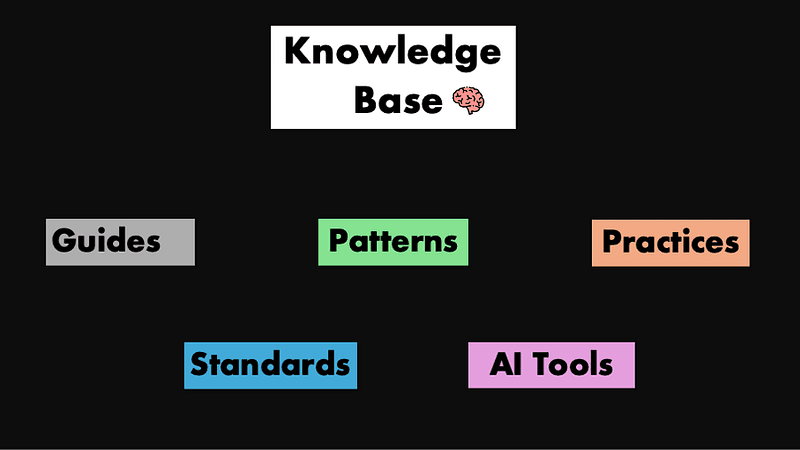
Well, if you’ve been in this situation, that’s why I decided to create a knowledge base for AI that can set our patterns and style guides, share how we configure AI tools, and document all the patterns a company or project needs to follow. This knowledge base needs to be universal—document once, use everywhere, whether you’re working with Cursor, Claude Code, or collaborating with your team.
Why do we need it?
Okay, so if you still need convincing, let’s talk about three reasons why it’s important to have this knowledge base specialized for AI.
Share Knowledge That Actually Gets Used
I’ve been a big proponent of documentation as a great way to share knowledge between teams. As your team grows and practices evolve, you can share recipes, tips, and tricks. This makes it super fast for developers to start developing and focus on bigger problems (how to make customers happier or create better product features) instead of figuring out how to build a page, table, or dialog again.
This is the first reason why I think it’s important to have this knowledge base for AI — it’s not only used by AI but also shared with all team members. Good for onboarding and standardization.
Stop Recreating AI Tool Configuration
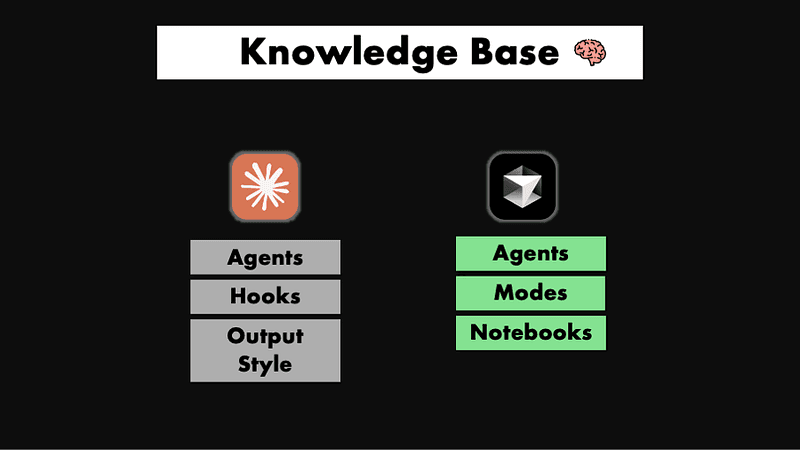
Another reason is that there are a lot of AI tools and if we configure or write agents for one tool, we have to recreate the same strategy in others if we want consistency. By centralizing how we create an agent that checks stability (just an example), we can reuse it in both tools. It doesn’t matter what format each tool needs—we just point to the document that has the details.
Allow Developers to Choose Their Workflow
We want to allow developers to try different workflows without forcing them into one approach. You might think, “Well, we can just commit the .claude folder or .cursor folder to GitHub, and that’s how they can reuse agents and rules.” But moving the knowledge base to a separate folder lets developers choose their own way to use AI tools without being locked into a specific approach.
Here’s the difference: If we create a shared agent that does Angular development one way and put it directly into the .claude/agents folder, developers have to either use it as-is or create a PR to request changes to that shared configuration.
But if we put all the recommended agents, commands, and AI modes in a separate knowledge base, every developer can pick and choose what they need to create their own workflow. They’re not stuck with our decisions — they can mix and match based on their preferences.
Also, since AI tooling is changing daily, keeping AI configuration folders out of the main repo allows developers to download and experiment with new tools without risking interference with anyone else’s setup.
How do we create an Universal Knowledge Base?
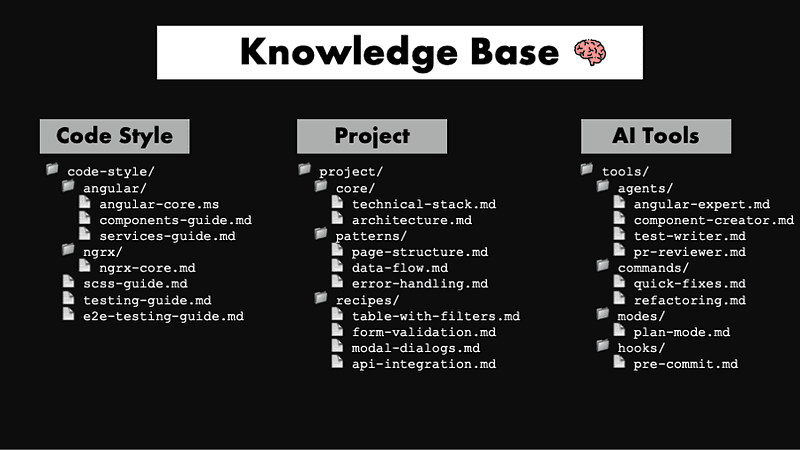
Well, now to get this working, we’ll create a knowledge base folder in your project with three major sections:
- Code Style — Framework and language patterns
- Project — Project-specific rules and guides
- Tools — AI tool configurations and templates
The key is creating specialized, focused files rather than monolithic ones. We don’t want one massive file that covers everything from creating components to unit tests to building pages with tables. Instead, we want targeted files that are concrete, concise, and reusable in multiple contexts. These files should be token-efficient and well-formatted for AI consumption (using Markdown and XML tags).
This modular approach gives us flexibility. For example, we can create a comprehensive agent that knows everything about Angular for complex tasks but also build a lightweight Claude Code command that only reviews component files and just needs a small subset of those specialized files.
The beauty is in the mix-and-match capability—each file serves a specific purpose, and you can combine them however makes sense for the task at hand.
Code Style
The code style folder is for all your framework patterns—guides, rules, and definitions that work across projects. If two projects share Angular, TypeScript, or Jest, they can share this knowledge base. Think about organizing this the way your mind categorizes development work. Angular patterns live in one folder, testing strategies in another, and component libraries get their own space.
The key is file granularity. When you’re building a component creation agent, it doesn’t need state management or directive context—just focused component standards. I structure each domain with a core foundation document plus specialized task files. angular/angular-core.md establishes your fundamental philosophy and shared patterns, while angular/components-guide.md focusing purely on component creation.
This approach lets you create surgical workflows instead of feeding every AI tool your entire knowledge base. A component expert gets exactly the context it needs—no token waste, no cognitive overload, just precise guidance that produces consistent results.
📁 code-style/
  📁 angular/
    📄 angular-core.md        # Angular setup and conventions
    📄 components-guide.md    # Component patterns
    📄 services-guide.md      # Service patterns
  📁 ngrx/                    # NgRx setup and conventions
    📄 ngrx-core.md           # Main rules on how ngrx is used
  📄 scss-guide.md            # Styling conventions
  📄 testing-guide.md         # Unit testing
  📄 e2e-testing-guide.md     # E2E strategies
Project
The project folder contains the specific patterns and conventions that make your application unique. While Angular fundamentals stay consistent across projects, each application develops its own approach to common problems. This folder documents how we’ve chosen to solve them and why.
This becomes crucial for team consistency. New developers can understand how we build table pages, implement pagination, or handle data exports without digging through existing code to figure out our approach. Instead of reverse-engineering patterns from scattered examples, they get direct guidance on our component library structure, usage conventions, and the solutions we’ve refined through experience.
When AI generates new code, this knowledge ensures it follows our established patterns rather than creating components that might work but don’t align with our standards. The AI understands exactly how we structure pages, organize components, and handle common scenarios.
📁 project/
  📁 core/
    📄 technical-stack.md      # Tech decisions & versions
    📄 architecture.md         # System design principles
    📄 deployment-flow.md      # How code reaches production
  📁 patterns/
    📄 page-structure.md       # Standard page layout
    📄 component-hierarchy.md  # How components relate
    📄 data-flow.md            # State management approach
    📄 error-handling.md       # Consistent error patterns
  📁 recipes/
    📄 table-with-filters.md   # Complete table implementation
    📄 form-validation.md      # Form patterns & validation
    📄 modal-dialogs.md        # Modal best practices
    📄 api-integration.md      # Service layer patterns
Tools
The Tools folder tackles a real workflow problem around sharing AI setups without forcing them on everyone. This folder contains agent templates, commands, and configurations that team members can choose to adopt, rather than putting them into the repository.
Here’s the issue we’re solving. Claude Code creates agents by adding files to .claude/agents/, but committing these to your repo means everyone gets the same AI setup whether they want it or not. That's like forcing everyone to use identical workflows by having the same set of agents, commands, etc.
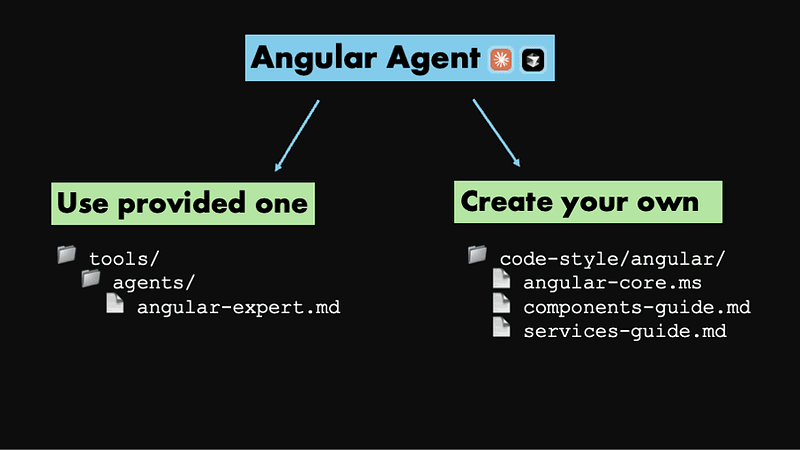
Instead, we store suggested configurations that teammates can pick and choose from. Want our Angular expert agent? Grab the tools/agents/angular-expert-agent.mdPrefer building your own? Start with our templates and customize.
These configurations get powerful when they reference your existing guides. An Angular expert agent pulls from code-style/angular/core.md. A component creator combines the Angular core code-style/angular/core.md with your component patterns code-style/angular/component-guide.md. A table generator uses your table recipes. You're not duplicating content—you're creating smart entry points into your knowledge base.
📁 tools/
  📁 agents/
    📄 angular-expert.md      #Full Angular agent
    📄 component-creator.md   #Component specialist
    📄 test-writer.md         #Test generator
    📄 pr-reviewer.md         #Code reviewer
  📁 commands/
    📄 quick-fixes.md         #Common fixes
    📄 refactoring.md         #Refactor commands
  📁 modes/
    📄 plan-mode.md           #Cursor Mode to start planning
  📁 hooks/
    📄 pre-commit.md          #Claude Code hooks
Folder Structure Example
Here’s the full folder structure bringing it all together:
📁 knowledge-base/
  📄 core.md                    # Index and overview

  📁 code-style/
    📁 angular/
      📄 core.md                # Angular fundamentals
      📄 components.md          # Component patterns
      📄 services.md            # Service patterns
      📄 directives.md          # Custom directives
      📄 pipes.md               # Custom pipes
      📄 ngrx.md                # State management
    📄 html.md                  # HTML standards
    📄 scss.md                  # Styling conventions
    📄 typescript.md            # TS best practices
    📄 testing.md               # Unit testing
    📄 integration-testing.md   # Integration tests
    📄 e2e-testing.md           # E2E strategies
    📄 documentation.md         # Doc standards

  📁 project/
    📁 core/
      📄 technical-specs.md     # Tech stack
      📄 architecture.md        # System design
      📄 folder-structure.md    # Project organization
      📄 environments.md        # Dev/staging/prod
    📁 code-style/
      📄 design-system.md       # UI library
      📄 shared-components.md   # Reusables
      📄 data-selectors.md      # Test selectors
      📄 mock-apis.md           # API mocking
      📄 feature-flags.md       # Feature toggles
    📁 guides/
      📄 create-table-page.md   # Table pattern
      📄 implement-sidebar.md   # Navigation
      📄 form-validation.md     # Complex forms
      📄 error-handling.md      # Error patterns
      📄 auth-flow.md           # Authentication

  📁 tools/
    📁 agents/
      📄 angular-expert.md      # Full Angular dev
      📄 component-creator.md   # Components only
      📄 test-writer.md         # Test generation
      📄 pr-reviewer.md         # Code review
      📄 refactoring.md         # Code cleanup
      📄 bug-fixer.md           # Debug specialist
    📁 commands/
      📄 quick-fixes.md         # Common fixes
      📄 generate-crud.md       # CRUD operations
    📁 modes/
      📄 architecture-mode.md   # System design
      📄 learning-mode.md       # Onboarding
    📁 hooks/
      📄 pre-commit.md          # Validation
      📄 post-generate.md       # After generation
Once this knowledge base lives in your repository, developers gain genuine workflow autonomy. If I want to create a Claude agent, I can build it in my own workspace and reference whatever combination of guides makes sense for my approach. Maybe I use the suggested Angular expert configuration as-is, or maybe I craft my own version that pulls from specific guides and adds my personal development preferences.
This flexibility transforms how teams approach AI-assisted development. Instead of one-size-fits-all configurations, each developer can curate their AI toolkit while still building on shared institutional knowledge. The knowledge base becomes the foundation, but the workflows remain personal and adaptable.
Hopefully I’ve convinced you of the benefits of having a universal knowledge base for your AI that lives outside individual tool configurations. This approach helps not just AI, but your entire team—they get written documentation on how things should be implemented, and you can reuse these documents across multiple tools. In a landscape where new AI tools keep emerging, having the freedom to choose and experiment with different workflows becomes crucial.
The three-folder structure covers this spectrum from general to specific: framework patterns in code style, project conventions, and tool-specific configurations. Each layer builds on the previous one, creating a knowledge hierarchy that scales with your needs.
Try it out, start small, and most importantly, make it fit your team’s actual workflows and needs.