Living Specs in SpecKit
Keep one document per feature next to its code, rewritten each time you ship, so you and your agent always know how the product works today.
Nine months ago I started building a VS Code extension in the open, and I ran every change in it through spec-driven development. A few weeks ago I wrote about what that left behind: a specs folder I never opened again, and an agent that never opened it either.
That piece ended with a promise. I'd cut one feature from it to keep it readable, and I now think that feature, specs you can reuse, holds the whole method together.
In SpecKit Companion it's called a living spec. Instead of one spec per change that freezes the day it ships, you keep one spec per feature, like billing or auth, that says what the feature must do today. Every run that touches the feature loads it before drafting anything, and rewrites it when the work is done. The rest of this piece hangs off that loop:
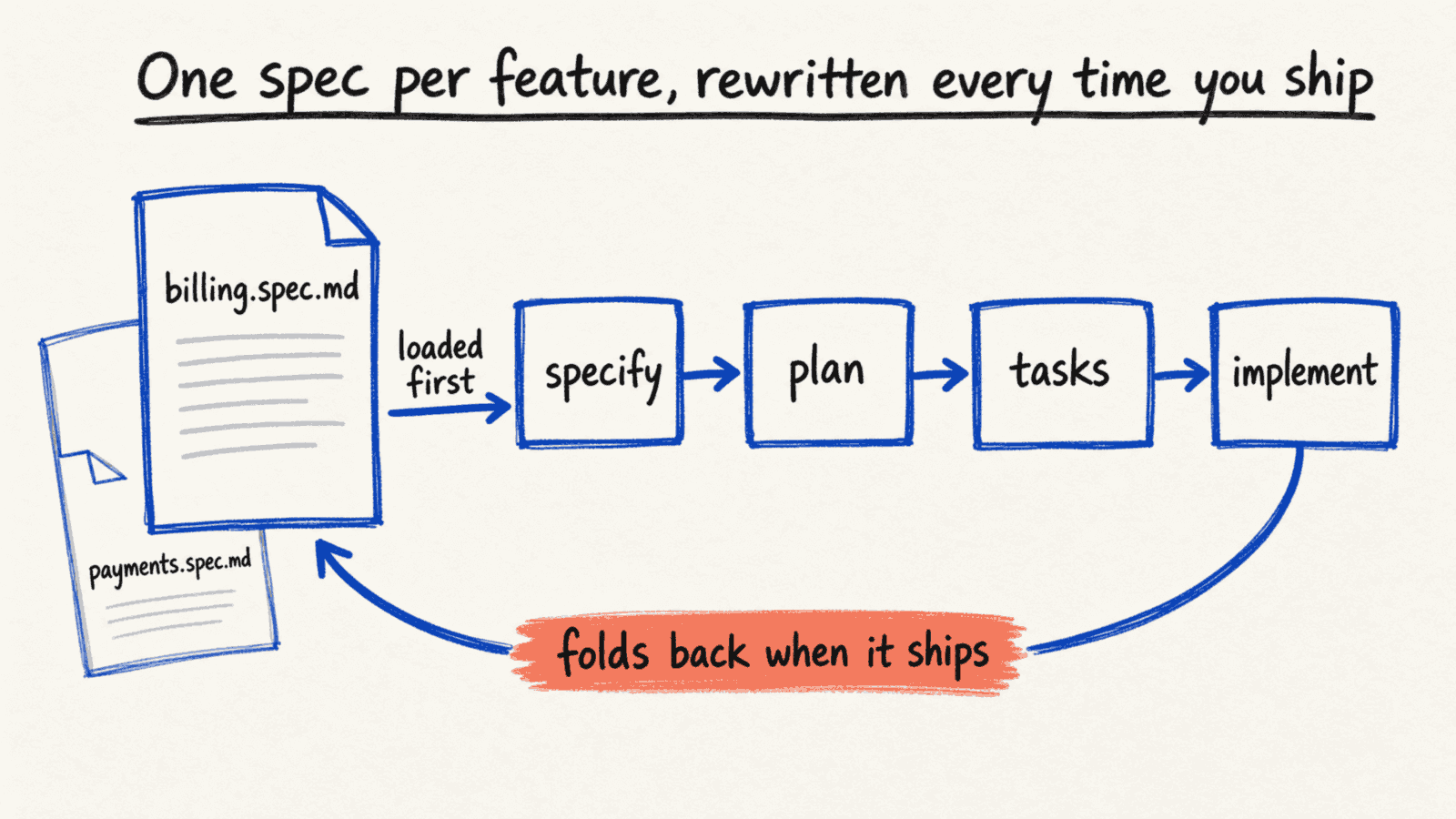
The usual setup has no arrow back, so a spec is written once and every later run starts over from the code.
What a spec is, and where it usually dies
In most agents you can already ask for a plan before any code gets written. Spec-driven development slices that plan into phases: specify what the feature must do, plan how, break it into tasks, then implement. Each phase leaves a markdown file in the repo, and you read each one before the next runs. You get to see whether the implementation is going your way, step by step, with a little more control than letting it run.
That part works. It's why I ended up with ninety-four of those folders.
What nobody talks about is what happens to the files after the feature ships. In the usual setup, nothing. Spec-kit gives each feature its own numbered folder, and that folder is finished the day the feature is:
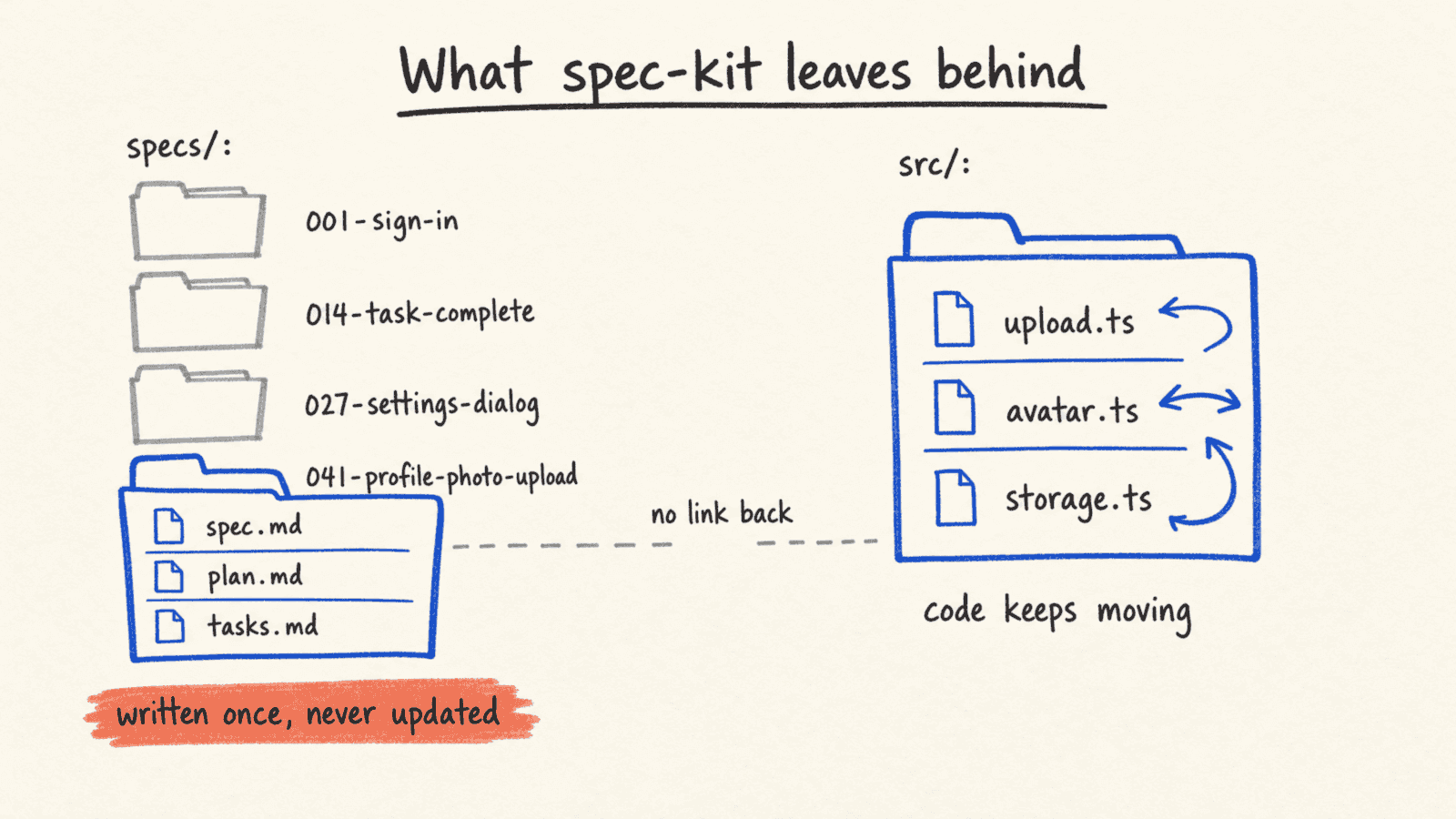
The code keeps changing after that, and nothing carries the change back, so each folder is only true for the week it was written. That's where three problems start, none of them dramatic, all of them normal.
Every spec starts from zero
Every time a spec touches something, say a dialog, the specify and plan phases go and investigate how that dialog works, and they write down what they learn: the data model, the pieces around it, the conventions. That's just normal. It's the phases doing their job.
The problem is that the next spec that touches the same dialog does the whole investigation again. Nothing from the last time is there to point at. The understanding was real, and it got written down, and then it got filed in a folder the next run doesn't read. So the agent re-derives it, every feature, from the code.
A living spec is a pointer to that previous understanding. When the next run starts, the agent has more guidance, faster, because the record of how the feature works is already there and already current.
You can't find how a feature works
The second problem is the one I felt as a person rather than as an agent. Once a spec exists, it's hard to find out what the feature is supposed to do today.
Take one thread in my repo: how a task gets marked complete. I iterated on that many times. Each iteration got its own spec, its own requirements, its own record of what I believed at the time. Ask the folder how task completion works today, and this is the shape of the answer:
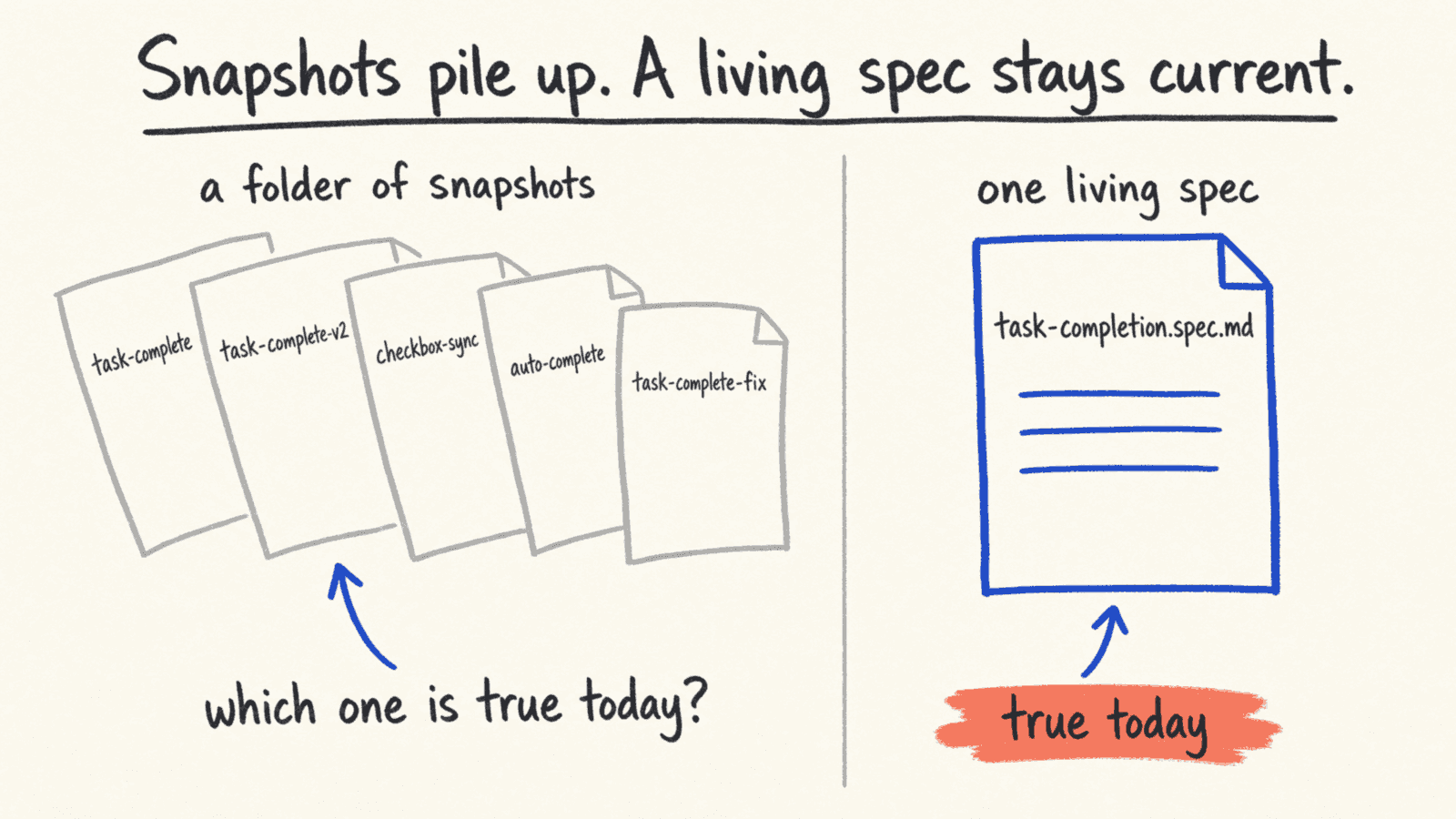
Five specs touch it, four are superseded, and none of them says which. A living spec gives that question one place to land.
It isn't that I filed them badly. A spec is a snapshot of one moment's intent, and snapshots don't update. Stack ninety-four of them and you don't have documentation, you have an archive. There is a name for this in the writing about spec-driven development: most teams pay for a spec that stays and get the benefit of a spec written once and forgotten. That was me.
The agent reads what's nearby
The third problem is about where the agent looks. Ask Claude, or any provider, to work on a feature without a spec run, and it reads the code near the thing you named. That's fine. The code sitting right there is real information.
Two things make it less fine. The neighbor code isn't always what you would consider the standard, so the agent copies a convention nobody endorses. And the specs folder, the one place where the intended behavior is written down, is unfeasible to go through, because it accumulates fast and nothing in it says what is current. So the agent goes around it. It's right to.
This is the observation that shaped the whole design: a markdown file sitting next to the code it describes gets read, spec run or not, by any provider, in any prompt. The location is the feature. There is research on how models lose what they were told before the conversation ends, and a file that survives the session is what brings it back.
Specs that get a second life
Reading about how other workflows handle this, especially OpenSpec, is what inspired the feature. OpenSpec keeps one durable spec per capability and folds each change back into it when the change ships. The specs get a second life. I liked that a lot, because it meant a spec wasn't going to become a dead file in a dead folder. It was going to be documentation I could read later, modify, adjust.
I also looked at what that looks like in practice, across 788 public repositories using it. Two things stood out. The fold-back step is manual, and skipping it is how the record dies: code keeps moving, the specs sit still, and nobody notices for months. And nobody maintains prose nobody reads. Even mature repos leave the purpose line as a placeholder. Those two things decided what SpecKit Companion would do differently.
What a living spec looks like
In Companion, a living spec covers one capability, like checkout, auth or billing. The examples from here on come from Teamboard, the small demo app I use for the extension's screenshots: a team directory where members have profiles, photos and a search box.
Turning it on is one file at the root of the project, and the feature is off until that file exists. Each capability gets a name and the files that belong to it:
# 📃 living-specs.yml
enabled: true
capabilities:
  - name: member-profiles
    match: ['src/features/profile/**', 'src/api/members/**']
  - name: directory-search
    match: ['src/features/directory-search/**']
    spec: src/features/directory-search/directory-search.spec.md # 👈 lives next to the code
The match globs are how Companion knows which capability a change touches, so it's the part that matters most. The spec line decides where the file goes. Without it, the spec lives centrally at capabilities/member-profiles/member-profiles.spec.md, the way OpenSpec does it. With it, the spec sits in the folder of the code it describes. Side by side, the two options look like this:
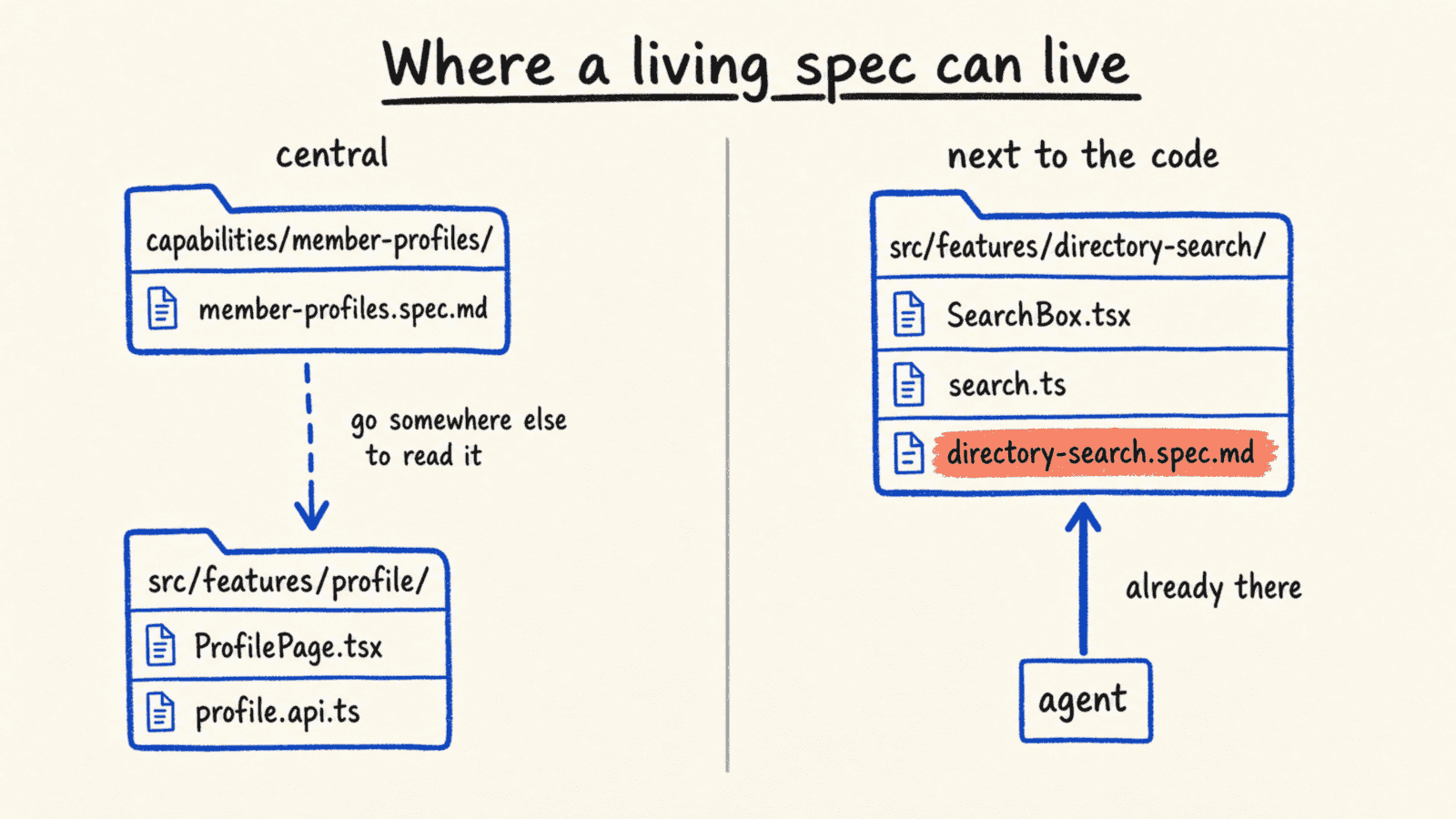
The difference is who finds the spec without being told where it is. You can pick per capability, and /speckit.companion.living-move moves a spec between the two later, so nothing here is a commitment.
Inside, a living spec holds what the capability must do today, as requirements and scenarios, and nothing about how it was built. Here's the start of the one for member profiles:
<!-- 📃 capabilities/member-profiles/member-profiles.spec.md -->
# Member Profiles

## Purpose

Every Teamboard member has one profile: a name, a role, a team and a short bio.
This capability owns who may read a profile, who may change it, and what the
rest of the product is allowed to assume about its fields.

## Requirements

### A member edits only their own profile

A profile update MUST be accepted only from the member it belongs to or from a
workspace admin.

#### Scenario: a member opens another member's profile

- **WHEN** the viewer is neither the owner nor an admin
- **THEN** the profile renders read-only and the update endpoint refuses the change
There's no component name, no endpoint path, no data model in it. That's on purpose: the code can be refactored under it without the spec going stale, and the part that would go stale, how it's built, is the part the agent can always read from the code.
Next to the code, and in a tree
My hypothesis, or the reason I feel it's better this way, is navigation. I made a version of this argument once before, for an earlier tool, and living in a real repo for a few months has only made it stronger. If every spec lives in a capabilities/ folder, that's already a step forward, because the specs got extracted from the pile. But it also means that when I'm looking at the code, I have to go somewhere else to find out what it's supposed to do. If the spec sits beside the code, I'm already there. And so is the agent.
The thing that keeps this from turning your source tree into a mess is the sidebar. The Living Specs view shows every capability as a tree, grouped by where it lives:
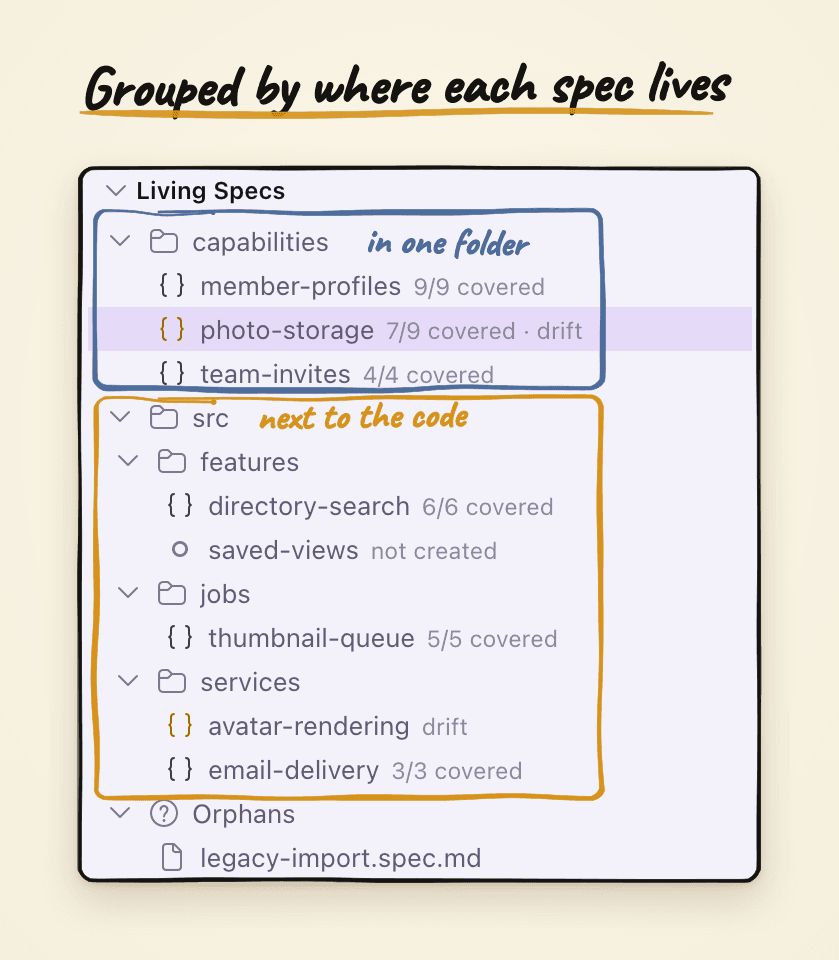
Both kinds sit in the same tree, so putting a spec next to the code doesn't make it harder to find. Other tools don't do this part, and it's the part that made colocated specs practical for me: easy to find, easy to navigate, and opened in a viewer that renders the spec as a page rather than raw markdown.
Adopting one area at a time
Owning the location also lets you adopt one domain at a time. Maybe you use spec-driven development and you own a domain, and you don't want to force it on the whole team. You adopt that domain. From then on, everything that touches it uses living specs, and everyone else's workflow is untouched.
Adopting is one command pointed at one folder:
/speckit.companion.living-adopt src/features/directory-search
It reads that area's surface (the routes, the screens, what each one needs before it renders), proposes the capabilities for just that area, and stops to show you the names, the globs and where each spec will live. Once you confirm, it drafts the spec and adds the capability to living-specs.yml. The draft doesn't pretend to be more than it is:
<!-- 📃 src/features/directory-search/directory-search.spec.md -->
# Directory Search

> [DRAFT] Adopted from the code's surface and the project's conventions. Review before trusting.

## Purpose

The directory is how a Teamboard member finds a colleague. This capability owns
what a search matches, how results are ordered, and which members a searcher is
allowed to see.

## Requirements

### A search matches name, role and team
...

## Uncovered
Each requirement is marked as observed in the code or inferred, anything it couldn't settle carries a [NEEDS CLARIFICATION: …] that it walks you through one at a time, and rules nobody owns land under ## Uncovered. The banner goes away when the last marker does. On adoption day your job is reading and correcting a draft, and the markers show you which parts nobody has confirmed yet.
Written as a side effect of shipping
Here's the part that answers the objection I take most seriously, that spec-kit claims to keep specs alive and delivers specs that freeze. You don't keep a living spec current by hand. The pipeline does.
When a spec run starts, the specify phase has a step that finds the living specs for the area you're touching and loads them before it drafts anything. Not only the leaf you named: the parents in the hierarchy too, so the new feature spec starts from what is true across the whole area. Plan works from that. Tasks work from that.
The rewrite happens at the end. While it finishes the feature, the agent adds a short section to the feature's own spec for each capability the feature changed, saying what changed. For the profile photo feature in the demo, that section looks like this:
<!-- 📃 the feature spec for 041-profile-photo-upload -->
## ADDED Requirements
<!-- capability: member-profiles --> <!-- 👈 which living spec it goes to -->

### A member sets their own profile photo

#### Scenario: a member uploads a new photo
- WHEN a member picks a JPEG under 5 MB on their own profile
- THEN the photo replaces the previous one
When you mark the feature complete, that section folds into member-profiles.spec.md: an added requirement is appended, a modified one replaces the old text, a removed one is deleted. There are four kinds (ADDED, MODIFIED, REMOVED, RENAMED), and a feature that changed two capabilities sends each one only its own section. Because the section is written into the feature's spec, it shows up in the same PR diff as the code, so the change to the living spec gets reviewed instead of applied blindly. If a run loaded a living spec and wrote nothing for it, completion names it and says there was nothing to fold, so a skipped fold-back is visible rather than silent.
The first real feature I ran this way was a webview rendering change. The ticket said nothing about HTML safety. The living spec for that area did, and the rule traveled through every phase until it became something I could tick:
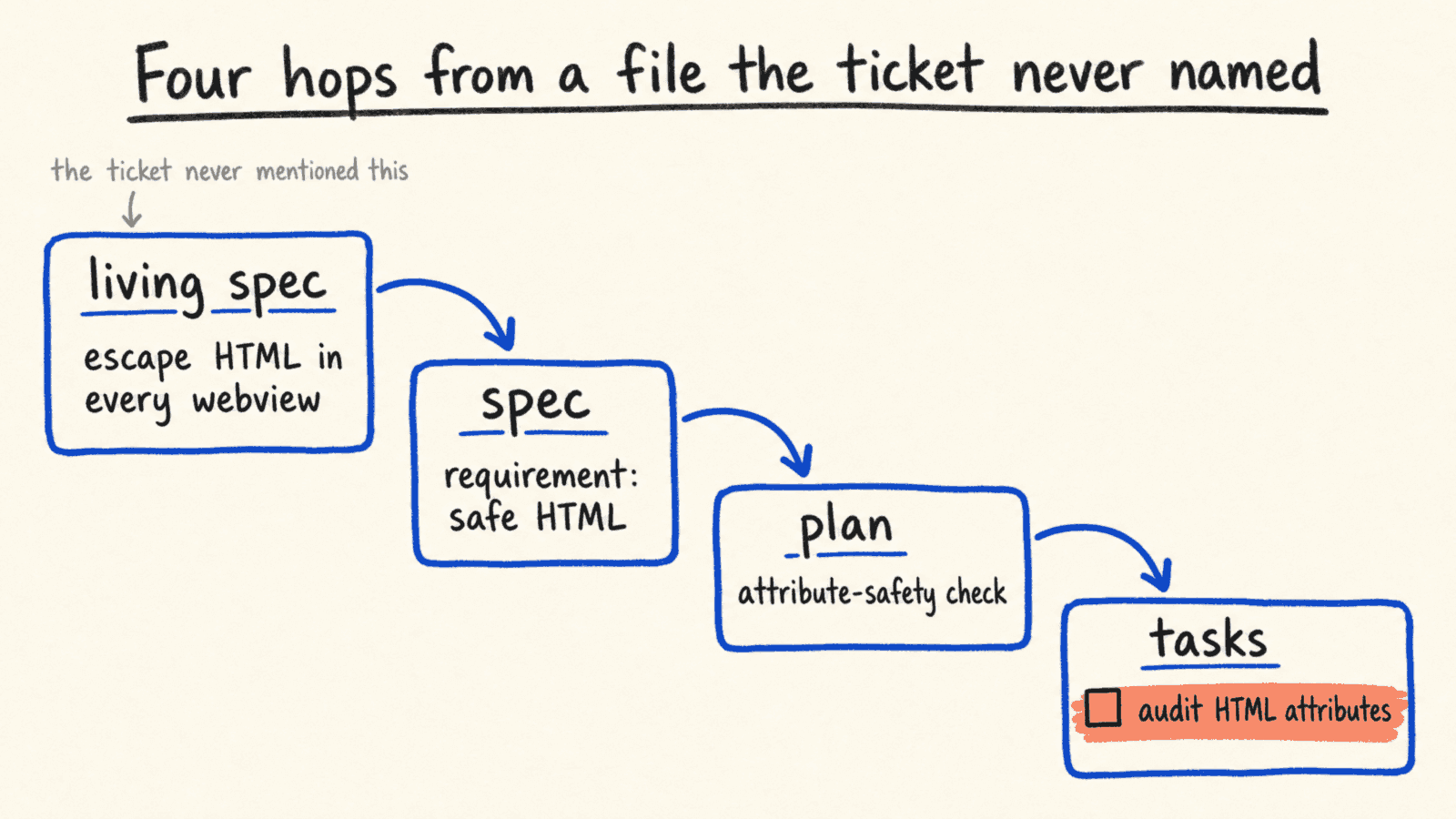
The rule reached the work because the spec was loaded, not because anyone remembered it.
What also made me trust this is that it shows its work. The Overview of a finished run lists the living specs it found, with a badge that says whether they folded back:
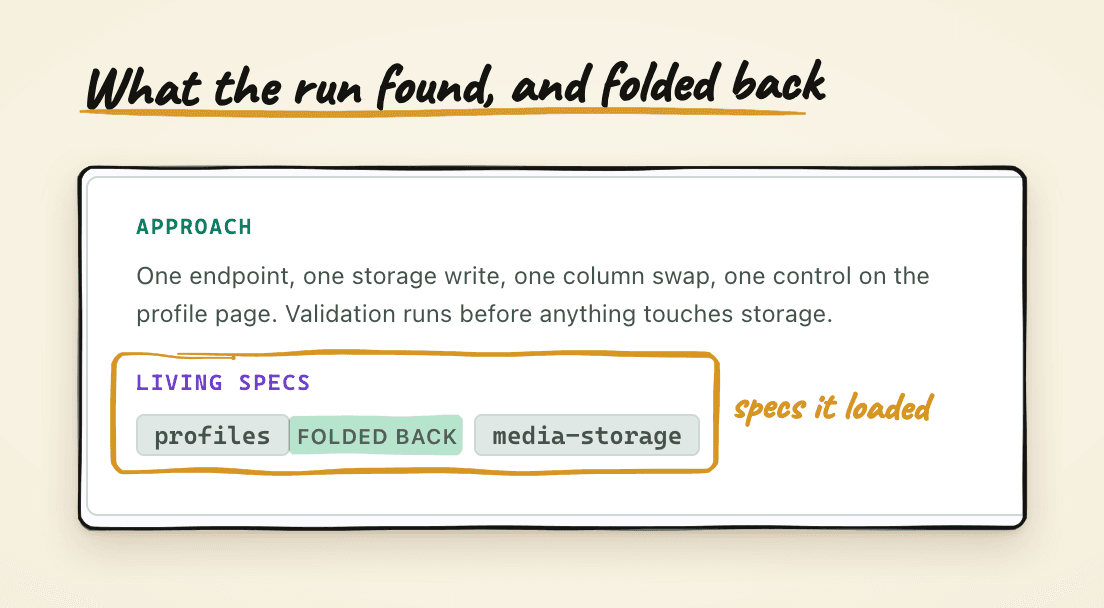
The badge tells me the run found all the relationships, not just the one I pointed at, and that the record is current as of this feature. Kent Beck's objection to spec-driven development was never that you write things down. It was that you write them down and they freeze while the code moves. Fold-back at completion is the thaw.
When you worked outside the pipeline
Sometimes, and this is really normal, I don't use spec-kit at all: big spikes, exploratory features, a quick fix on a Friday. Now imagine a team of dozens, where not everyone runs the same workflow with AI, and that's fine too. The code moves and the living spec sits still, which is exactly the way the records died in those 788 repos. So Companion watches for it, and this is the path back:
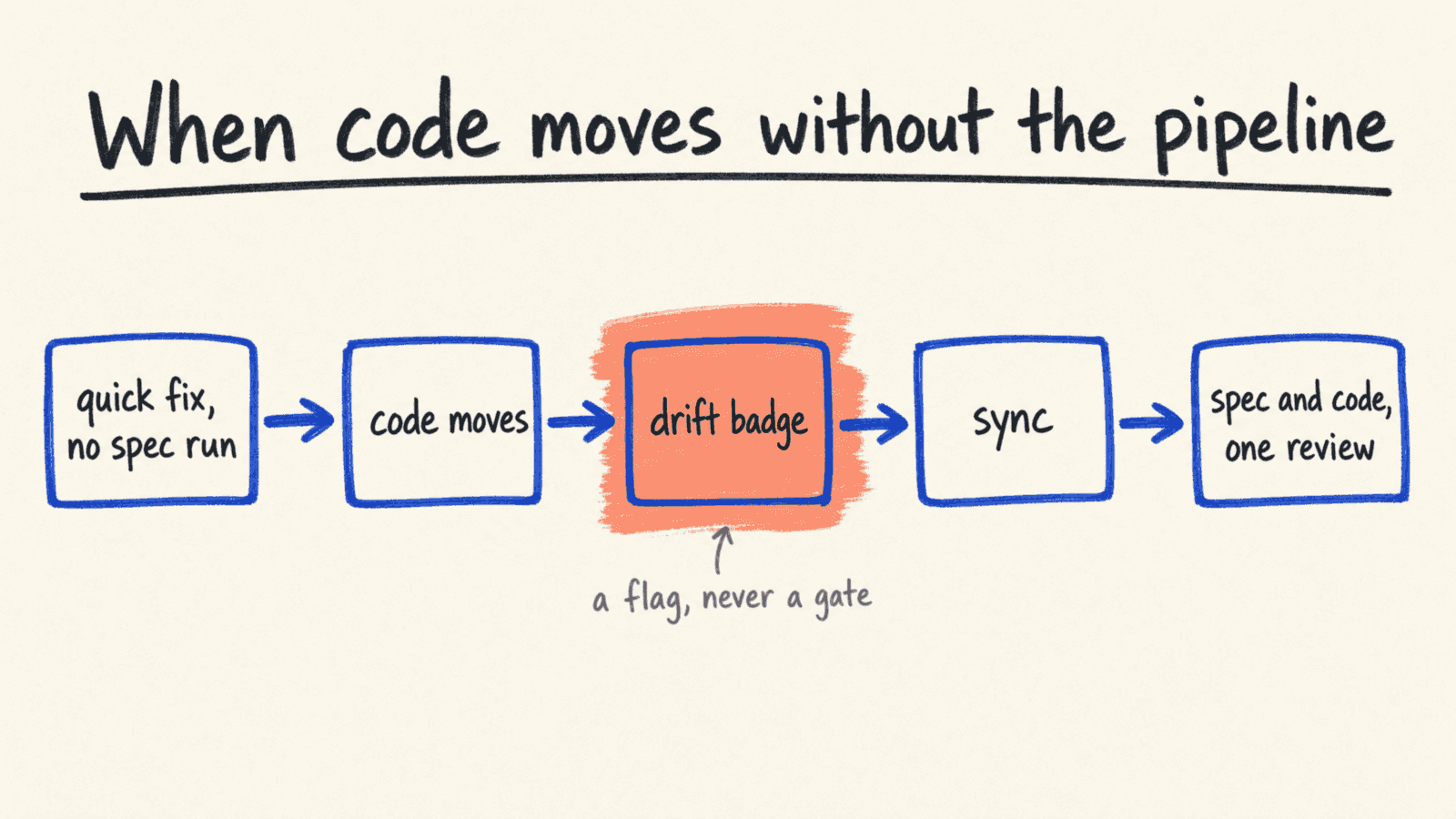
Nothing blocks the quick fix. Drift is information, not a gate: a flag never stops a run, it just means you know, and you sync when you're ready.
Each capability whose code changed since its spec was last committed carries a drift badge in the sidebar. From the terminal, it's two commands:
# 👇 what moved, uncommitted work included
/speckit.companion.living-drift --working

# 👇 update every affected spec
/speckit.companion.living-sync
Drift lists, per capability, the files that changed since its spec was last committed, and says how each one slipped. A tracked file went through the pipeline but its change never folded back, a missed sync. An unspeced file changed entirely outside the pipeline, so the living spec never saw it at all, which is the one to look at first.
Sync then groups your changes by capability, reads what actually changed, and updates each affected spec. It edits rather than regenerates: every requirement and scenario the change didn't touch stays word for word, so a sync never flattens what someone wrote by hand. And it leaves the edits uncommitted, so the code and the spec get reviewed together. The spec page has the same thing as an Update button:
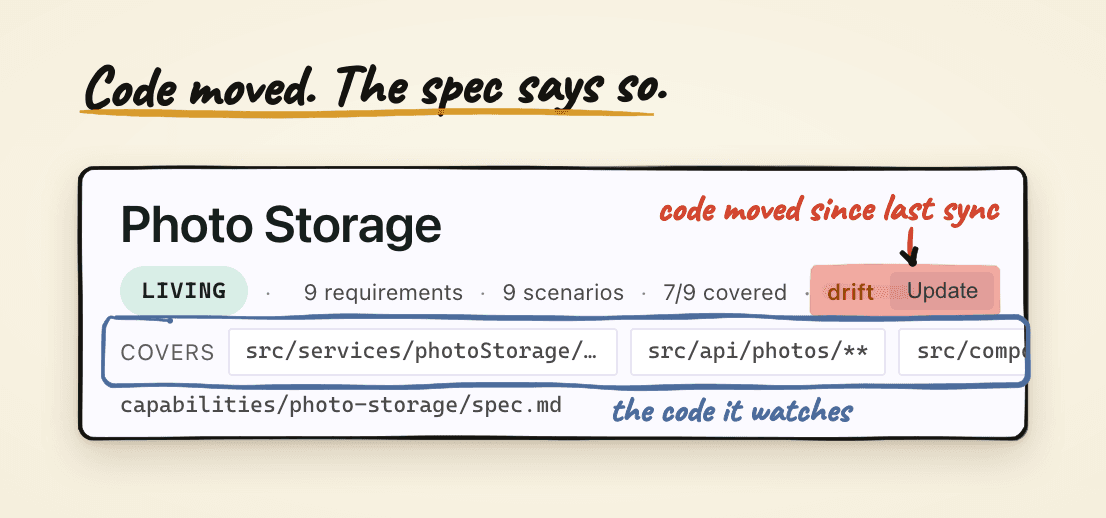
The covered paths are what drift is measured against, so a spec only flags when its own code moved, not every time someone touches the repo.
What it asks of you
It asks for adopting the system: adding domains, organizing as a team, deciding where you want your living specs to live. And it asks for being conscious that you'll need to sync and get rid of drift, because it happens.
There is also something it doesn't do yet, and I'm still thinking about it. While specify and plan run, they gather a lot: data models, architecture, decisions. Right now the living spec keeps how the feature works and nothing else. I don't know yet whether those other artifacts should be persisted too, whether they add to the understanding of the feature or just add to the context, and whether they would stay maintainable. That's an open question, not a roadmap.
And to be fair to the other side: there is a good argument that an executable test is the more durable contract, because it survives a model upgrade unchanged where prose gets reinterpreted. I think that's right, and I think a living spec holds something a test cannot, which is why the feature exists at all.
Try it
Ninety-four specs nobody opened taught me less than the handful that get loaded every session.
If you want to try it, the steps below follow the order of this piece, and the guide has the rest.
- Install the spec-kit extension:
specify extension add companion --from https://github.com/alfredoperez/speckit-companion/releases/download/companion-latest/companion.zip - Create
living-specs.ymlat the root withenabled: true. Living specs are off until this file exists. - Run
/speckit.companion.living-adopt src/<area>on the one area you explain most often, and read the draft. - Ship a feature through the pipeline and check the Overview for the folded-back badge.
- When the sidebar shows drift, run
/speckit.companion.living-syncand commit the spec edits with the code.
To see it move before you install anything, the SpecKit Companion website has a short video that walks through living specs.
This is the first of the three threads I cut from the 238-specs piece. Give Spec Kit Superpowers introduced the other two, fast mode and auto mode, in a line each. Next up is auto mode properly: planning several features at once and reviewing the whole batch from the sidebar.