What is SDD (and Why I Built It)
What SDD is, why I built it, and how it differs from spec-kit. The origin story behind folding it back into spec-kit as the SpecKit Companion.
Update — SDD is now the SpecKit Companion. The ideas in this post have been folded into SpecKit Companion, a VS Code extension for spec-driven development. The story of the move starts in Build Log 0.
You know that feeling when the tool you picked starts getting in your way?
I didn't set out to build my own spec-driven setup. I was happily using GitHub's spec-kit, and I liked it enough to build a VS Code extension for it: the SpecKit Companion. I was all in.
Then the friction showed up. Every change kicked off a long ceremony and left behind a pile of files. Those files were hard to reuse. Coming back to a session after a break meant reconstructing where I had been. The same few rough edges, over and over.
So I built SDD, short for Spec-Driven Development. Not because spec-kit is bad. Because I wanted the parts that slowed me down to work better, on the one agent I actually use: Claude Code.
I'll say the twist up front, because this whole series builds toward it: I'm now folding those fixes back into spec-kit, through the same Companion I started with. Full circle. But first, what SDD actually is.
What SDD is
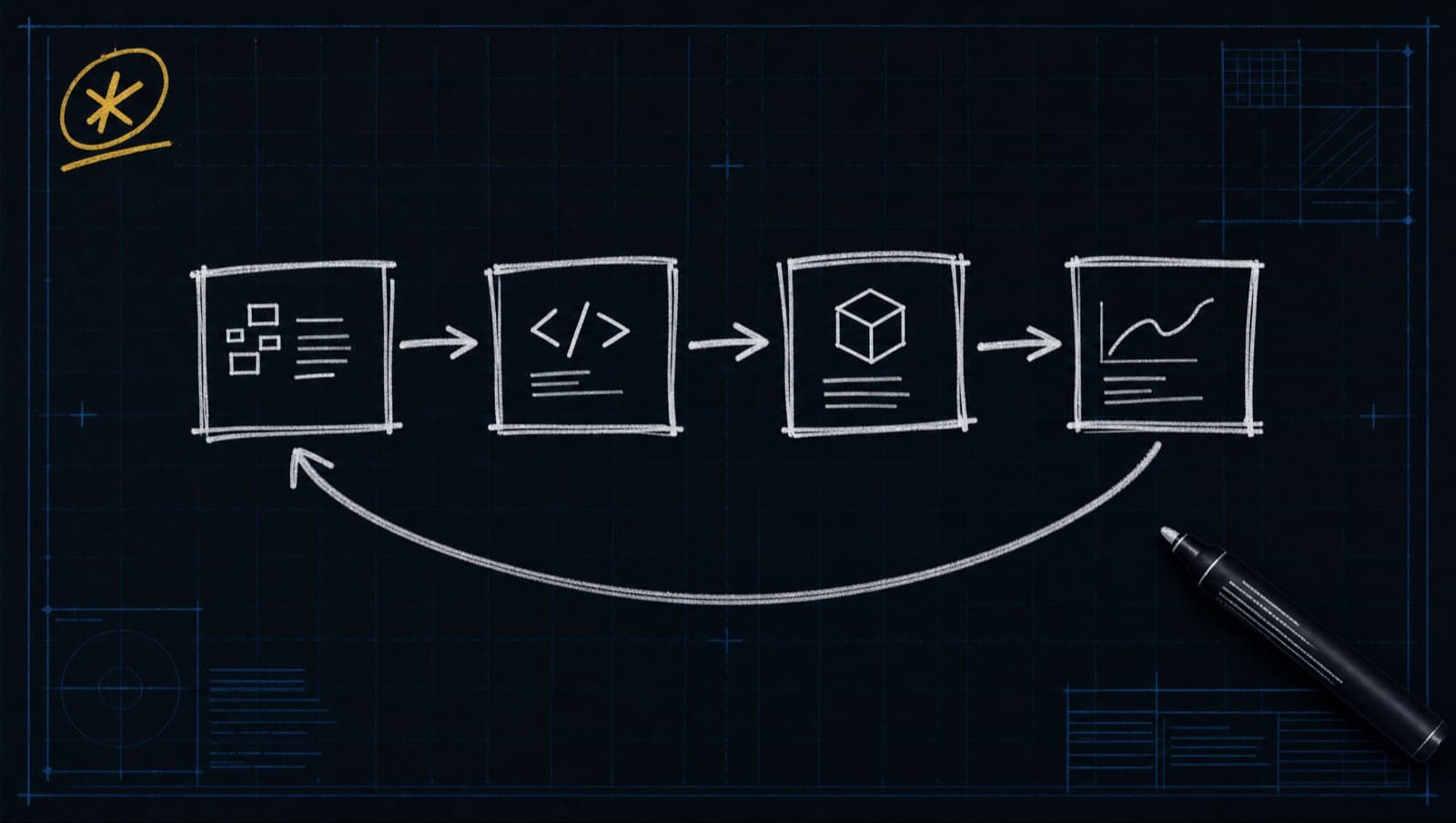
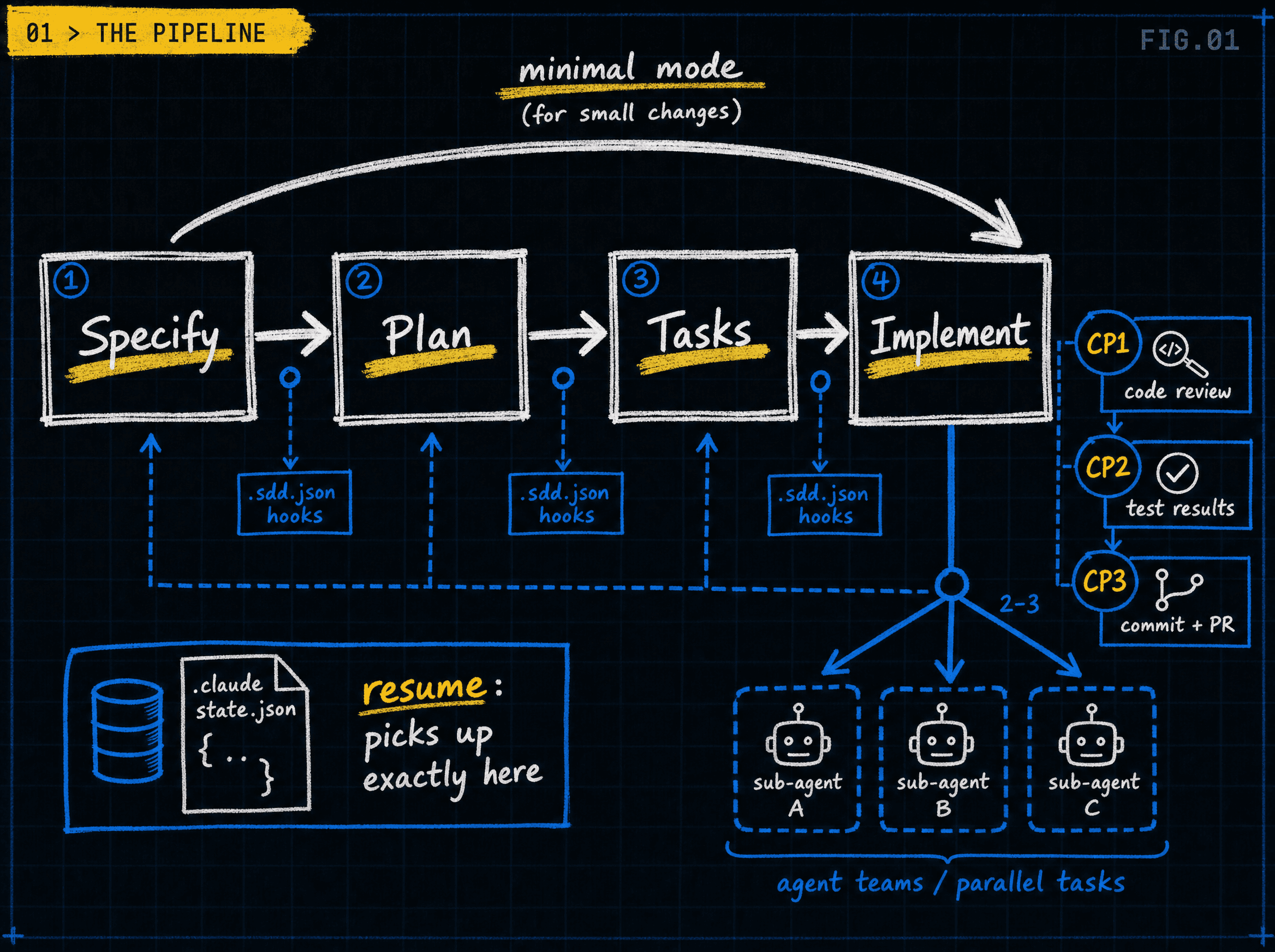
SDD is a Claude Code plugin. Every feature runs through four steps: specify, plan, tasks, implement.
It stays light by default. Small changes get detected and fast-tracked. Big changes get the full pipeline. A typo fix and a new auth system should not cost the same ceremony.
A few things make it feel different day to day:
- Specs are committed artifacts. They live in the repo next to the code and travel with the pull request.
- It is resumable. State lives in a file, so a dead session picks up where it left off.
- It has three checkpoints during the build: review the code, review the tests, review the commit. Human approval where it matters.
Why I went Claude-native
spec-kit is excellent, and it pioneered a lot of these ideas. But it is built to be agent-agnostic: a CLI plus command templates for more than 25 assistants. That breadth is exactly why it cannot go deep on any single one.
I only use Claude Code, so I wanted to spend that depth. Real skills, slash commands, hooks, and the things a generic CLI cannot lean on: sub-agent teams that run independent tasks in parallel, and resume from a state file. Those are the Claude Code features the pipeline above leans on.
And rather than patch spec-kit's ceremony (the versioned Constitution with its change-impact reports, the plan stage that fans out into several documents), I wanted adaptive ceremony and lean artifacts from the start. So I built SDD by borrowing the ideas I liked and leaving the ceremony I didn't.
How SDD differs from spec-kit
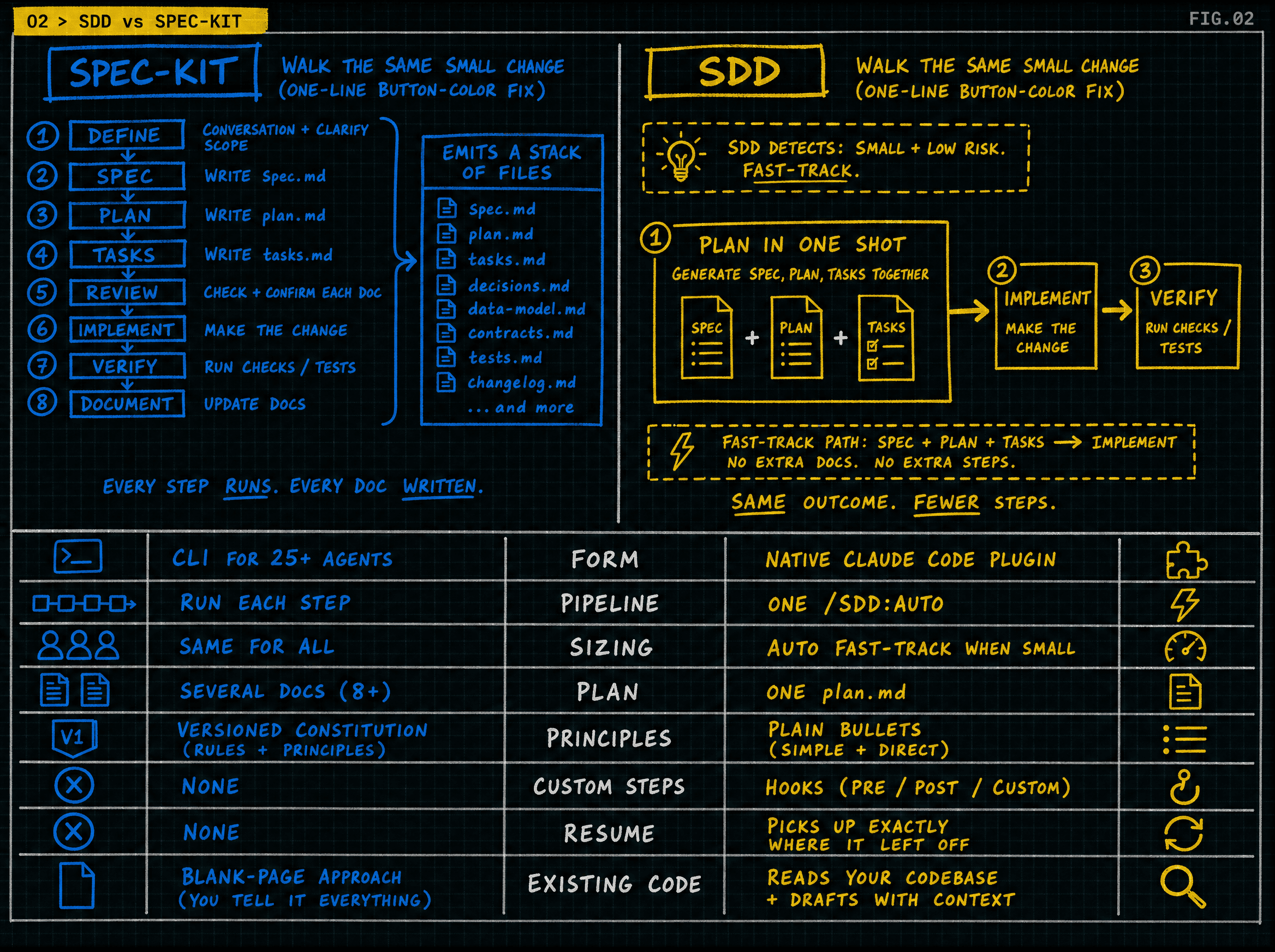
Here is the quick-scan version, then a few differences you can picture.
- Form. spec-kit is a CLI plus templates for 25+ agents. SDD is a native Claude Code plugin.
- Running the pipeline. With spec-kit you run each step. With SDD one command can run it all (
/sdd:auto). - Sizing a change. spec-kit uses the same process for everything. SDD auto-detects small versus big and fast-tracks the small stuff.
- Plan stage. spec-kit produces several docs. SDD writes one lean
plan.md. - Principles. spec-kit has a versioned Constitution with impact reports. SDD has an optional plain bullet list.
- Custom steps. spec-kit has none. SDD has hooks at pipeline points.
- Stop and resume. spec-kit has none. SDD picks up exactly where it left off.
- Existing codebases. spec-kit is mostly blank-page. SDD reads your code and drafts specs.
- Target. spec-kit aims at many agents. SDD targets Claude Code only, on purpose.
Now, what those differences look like in practice:
Plugin versus CLI. spec-kit is a tool you install and run in the terminal. SDD lives inside Claude Code. You type
/sdd:specify "add logout"in the same chat where you are already coding. It is the difference between an app you alt-tab to and a feature built into the thing you are already using.Claude-only, on purpose. This is the root of most of the rest. spec-kit has to speak to many assistants, so it sticks to what they all share: files and commands. SDD speaks only Claude Code, so it can reach for the deep features the generic tools cannot: hooks, resume, sub-agents. Narrow by choice, so it can go deep.
Auto mode versus manual steps. With spec-kit you run specify, then plan, then tasks, then implement. Four moves, like driving stick. SDD's
/sdd:auto "add rate limiting"drives the whole pipeline and only pauses at the safety checkpoints. Cruise control that still hands you the wheel when it matters.Complexity check. Change a button color and spec-kit still walks you through the full ceremony. SDD sees it is one line and writes the spec, plan, and tasks in a single shot, so you jump straight to building. A new auth system still gets the full treatment. The process scales to the work.
Hooks. Say you want your tests to run before every commit, or your VS Code extension to reinstall before each code review. In SDD you write that once in
.sdd.jsonand it fires at that exact point in the pipeline. spec-kit has no "do X at step Y" wiring, so you would remember to do it by hand each time.Resume. Your laptop sleeps in the middle of a 30-minute feature. With spec-kit you are rebuilding your mental state. SDD saved its place: re-run the command and it resumes at the exact task, still remembering the decisions it made, like "using Redis for the counter." A checkpoint, not a restart.
One plan versus a folder of plans. spec-kit's plan step produces a research doc, a data model, API contracts, and a quickstart. SDD writes one
plan.md, and a design doc only when a feature is big enough to earn it. Less to write, less to read, less to keep in sync.Principles versus a Constitution. spec-kit's Constitution is a version-numbered rulebook that emits a change-impact report every time you edit it. SDD's
principles.mdis a plain bullet list you jot down, like "all UI strings go through i18n," and the planner gently flags a plan that seems to break one. Same intent, none of the paperwork.Meeting existing code where it is. spec-kit mostly starts you at a blank page, which is great for new projects. SDD is built for the codebase you already have: a spec can live right next to the code it describes, and
/sdd:initreads your existing code and drafts the specs for you, one area at a time.Tasks: files versus user stories. spec-kit groups work by user story. SDD groups by files and dependencies, and marks which tasks are independent so it can run several sub-agents at once. Same loaf, sliced so it can parallelize.
The one-line philosophy underneath all of it: checkpoints after writing, not rigor before. SDD reviews real code at the checkpoints instead of gating the plan with heavy up-front validation.
And to be fair, this is not "SDD beats spec-kit." It is the lean, Claude-Code-native cut of the same idea. SDD borrows the Constitution concept as lightweight principles, the delta-spec idea from openspec, and the analyze idea, and it drops the ceremony.
The principles behind it
If you want the values in one place, here they are:
- Specs are committed artifacts, never thrown away.
- Adaptive ceremony. Do not impose process that does not pay rent.
- Resumability is a feature, not an afterthought.
- Post-write checkpoints, not pre-write rigor.
- A single-agent target, Claude Code, instead of forking to support everything.
- Hooks are the extension point, so you customize without forking templates.
- Templates stay lean by default.
Why I'm folding it into spec-kit
Here is the honest part. Building SDD taught me the workflow was never the hard problem. Adoption is. A spec-driven workflow only matters if people actually run it.
spec-kit already solved that. It has a large user base and a catalog of more than 150 community extensions. Competing with that as a solo, Claude-only plugin was the wrong fight.
So the mature move is to fold SDD's ideas into spec-kit, as the SpecKit Companion: the VS Code GUI plus a spec-kit extension, in one repo. Broad reach, a GUI that the CLI-only tools cannot match, and the deep ideas (living specs, rich tracking, auto mode) kept intact. The full reasoning, and how I got there, is article 03. And you can watch it get built, step by step, in the Build Log.
What this series covers
This runs on two tracks. Essays like this one cover the why and the what. A Build Log covers the how, live, with one short post per merged pull request as the SpecKit Companion gets built in public.
Next up in the essays: Layered Context, the four-layer context model, and Brownfield Adoption, specs that live next to your code and get drafted from your code. Then article 03, the pivot.
Want to follow the build? The backlog is public and ordered, and Build Log Episode 0 kicks it off.
And you can still try SDD today while the transition is underway. Add the plugin with /plugin marketplace add alfredoperez/sdd, then run /sdd:init. The repo is at github.com/alfredoperez/sdd.